Guide · Devices and the pulpit
How do I write sermons on an iPad and a Mac?
Start on the Mac in your study, fix a line on the iPad at the coffee shop, preach from it Sunday. Same sermon, no copies.
Free forever. No sermon limit, no card.
The short answer
Use a sermon editor that lives online, so every device opens the same copy. ServantSuite runs in Safari on iPad and iPhone, and in any browser on a Mac or PC. On a Mac you can also install the desktop app, which works offline and syncs when you reconnect. Preach from the iPad with one tap. A native iPad app is not out yet.
Last reviewed against the shipping product.
At a glance
- iPad and iPhone
- Safari today. Add it to your Home Screen.
- Mac
- Any browser, or the desktop app for offline
- Windows
- Any browser. Desktop app coming.
- Cost
- Free
“Is the iPad copy the newest one?”
The trouble with files
Pages on the iPad, Word on the Mac, a PDF in the binder. Every copy is a chance to preach last Tuesday's draft. Syncing files through iCloud or OneDrive helps until two devices edit at once and you end up with two files with the same name.
A sermon editor that saves to one place fixes this. Every device opens the same sermon, and every change saves as you type.
On the iPad: open Safari
Go to app.servantsuite.com and sign in. The editor runs in the browser, so there is nothing to install. Tap Share, then Add to Home Screen, and it opens like an app.
A keyboard case helps for long writing sessions. For a quick fix before the service, the on-screen keyboard is fine.
- Autosave as you type
- Type a verse reference and the passage is there
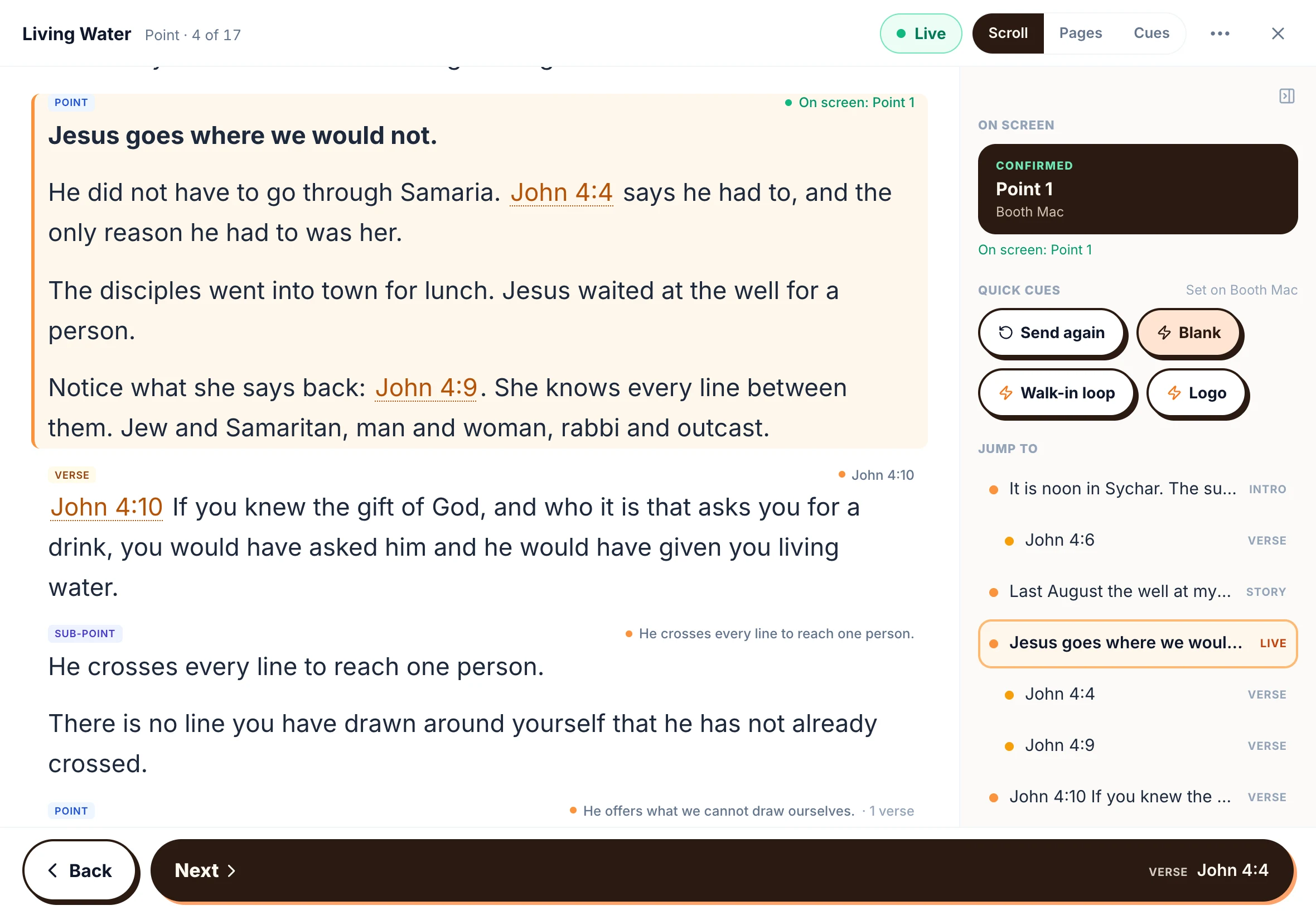
- Tap Preach and the iPad becomes your notes
“The church wifi is down again.”
On the Mac: browser or app
Any browser works. If you write where the internet is spotty, install ServantSuite for Mac. It saves to your Mac first and syncs when it can, so your sermon is there on the plane, in the hospital waiting room, at the cabin.
- Works offline, syncs when you reconnect
- Scripture and a study pane beside the manuscript
- Automatic Word backups to a folder you choose
Steady · Week 3
Preachintro
Good morning, church.
point
1. He leads before He feeds.
verse
The LORD is my shepherd
story
The summer we lost the farm.
Steady · Week 3
Live- intro
Good morning, church.
- point
1. He leads before He feeds.
- versePsalm 23:1-2
The LORD is my shepherd
- story
The summer we lost the farm.
When two devices edit at once
Every save checks for a newer version. If your iPad and your Mac changed different parts of the sermon, the changes merge. If they changed the same sentence, you choose which to keep. Nothing is overwritten quietly.
- Version history on every sermon
- Restore any earlier version
Preach from the iPad
On Sunday, open the sermon and tap Preach. Pick Scroll, Pages or Cues, set the text size, and the screen stays awake. A clicker or foot pedal that sends arrow keys turns the page.
Preach mode in the browser needs an internet connection to open the sermon. Open it before you walk up, or preach from the Mac app, which works offline.
Honest fit
Is ServantSuite right for you?
A good fit if
- You write on more than one device
- You are tired of emailing drafts to yourself
- You want to preach from an iPad or phone
- You sometimes write without internet, on a Mac
Look elsewhere if
- You need a native iPad app that works offline. It is coming; for now the iPad uses Safari and needs a connection.
- You write by hand with an Apple Pencil. ServantSuite is for typed notes.
- You need the desktop app on Windows today. Use the browser until it ships.
Free forever, for every pastor. Five-minute setup.
Set it up in ten minutes
- 1
Sign up on the Mac
Create a free account in any browser.
- 2
Install the Mac app, if you like
From Downloads, for writing offline. Optional.
- 3
Add it to the iPad Home Screen
In Safari, open app.servantsuite.com, tap Share, then Add to Home Screen.
- 4
Write anywhere
Every device opens the same sermon.
FAQ
Questions pastors ask.
Is there a ServantSuite iPad app?
Not yet. A native iPhone and iPad app is in the works. Today the full editor and preach mode run in Safari, and you can add them to your Home Screen.
Does it work offline?
The Mac desktop app works offline and syncs when you reconnect. The browser version, including on iPad, needs a connection.
Will my Pages or Word sermons come with me?
Word files import directly, and ServantSuite finds your points and notes. From Pages, export as Word first, then import.
Is there a Windows app?
The writing app is on Mac today, with Windows coming. On Windows, use any browser. ServantSync, the media computer app, already runs on both Mac and Windows.
What does it cost?
Nothing. Writing and preaching are free on every device.
Keep reading
All guides- Guide
How do I preach from an iPad instead of printed notes?
Trade the binder for a tablet. How to preach from an iPad or phone: text size, a clock, verses on tap, clickers, and what to do about wifi.
Read the answer - Guide
What's the best free sermon writing software?
The free sermon writing tools pastors use, what each one is good at, and what free really includes. Trials marked as trials.
Read the answer - Guide
How do I collaborate on sermon notes with my team?
Share sermon notes with your worship leader, media team and co-pastors. Comments, mentions, roles and version history, free for the whole team.
Read the answer
Try it this Sunday.
Free forever, for every pastor. No sermon limit, no card.
Questions first? Talk to a human