Integration · The booth
Is there sermon software that syncs with ProPresenter?
You move to point two on your phone. Point two goes up on the screen. Nobody in the booth had to catch it.
ServantSync is $29/mo per computer after a 14-day free trial. Writing stays free.
The short answer
Yes. ServantSuite's ServantSync app runs on your media computer next to ProPresenter 7.9 or later. Map each point and verse of your sermon to a slide once; auto-match does most of it. Then preach from your phone or tablet, and the matching slide fires as you go. Your clicker works too. ServantSync costs $29 a month or $299 a year per media computer, with a 14-day free trial. Writing and preaching stay free.
Last reviewed against the shipping product.
At a glance
- ProPresenter
- 7.9 or later, network on
- Media computer
- Mac or Windows
- Price
- $29/mo or $299/yr per computer
- Trial
- 14 days
“Who's running slides today?”
The gap between pulpit and booth
In most small churches, slides depend on one volunteer watching the pastor and clicking at the right moment. When they are sick or away, the pastor either preaches without slides or tries to run them from the pulpit.
ServantSync closes that gap. The sermon you preach from becomes the cue sheet.
Downhill · Week 1
Live- verseRomans 5:8
But God commendeth his love
- point
2. Grace runs downhill.
- story
The neighbor with the casserole.
- point
3. Grace pools at the bottom.
But God commendeth his love toward us, in that, while we were yet sinners, Christ died for us.
Romans 5:8
- On screen: Romans 5:8
How it works
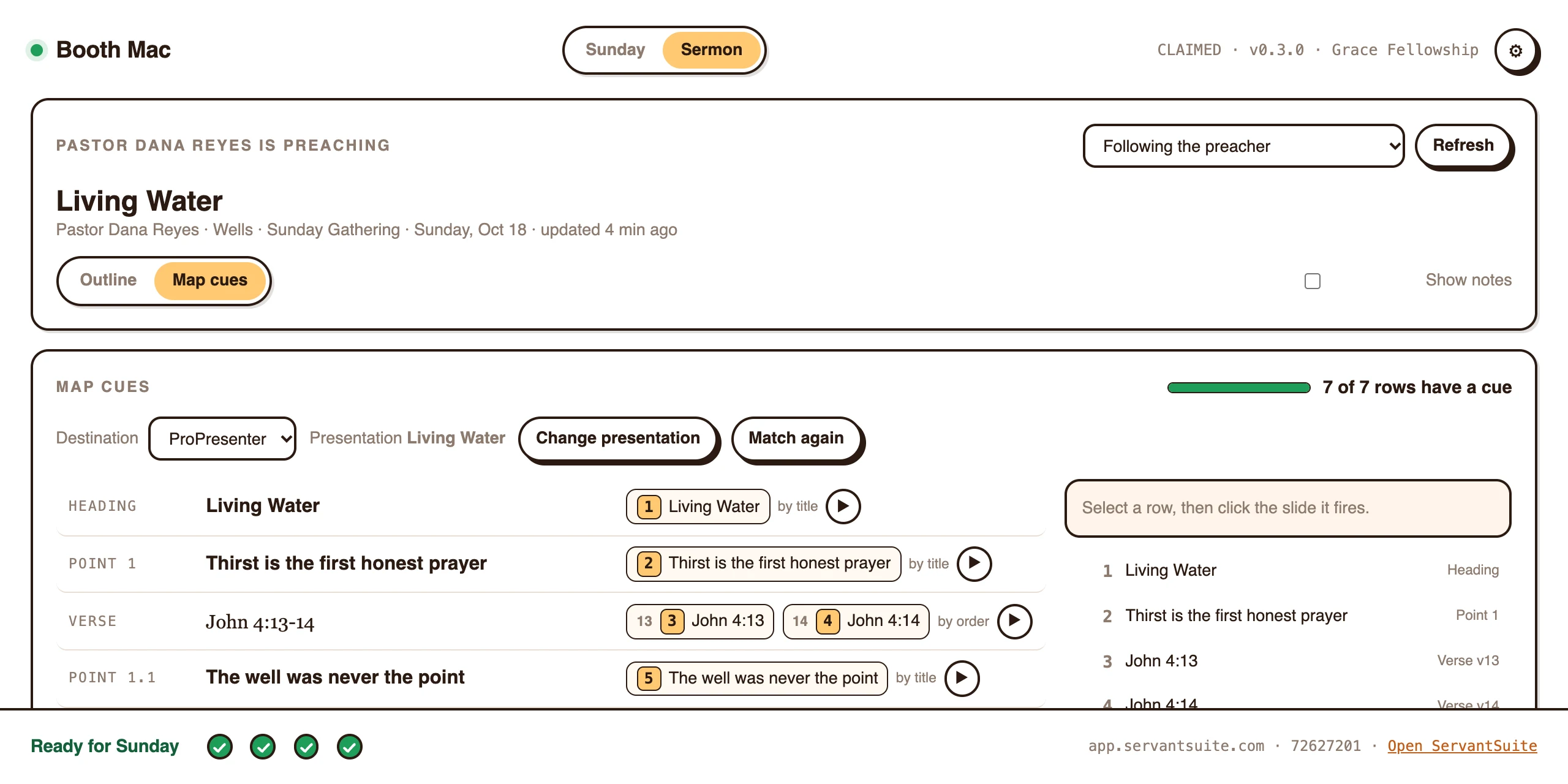
ServantSync is a small app on the media computer. It talks to ProPresenter through ProPresenter's own network API, on your church's network. When you move forward in preach mode, ServantSync shows the matching slide.
- Map points, verses and stories to slides once
- Auto-match lines your notes up with a presentation
- Reading ahead never fires a slide
- Your clicker moves notes and slides together
What the booth sees
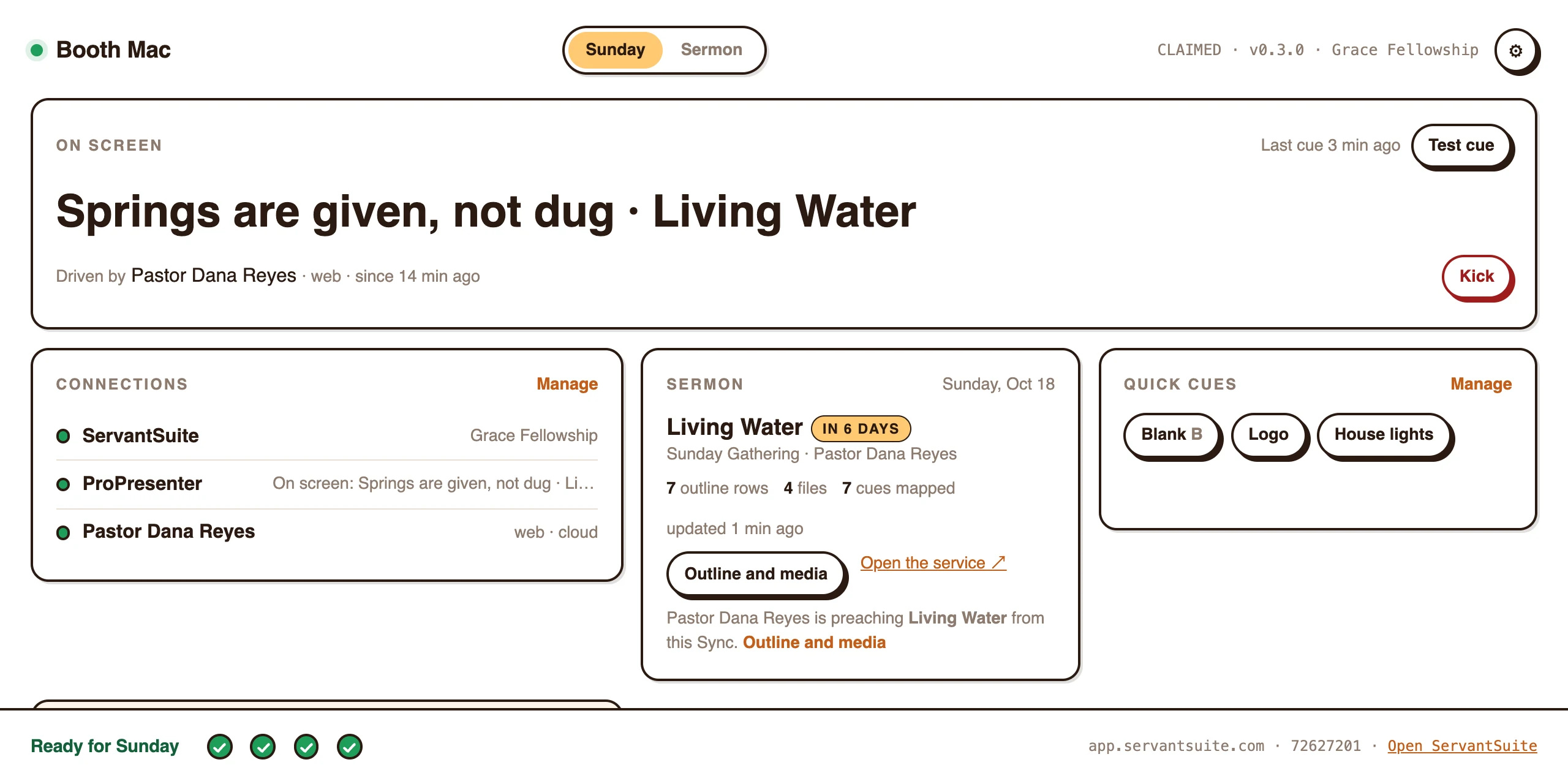
The media computer shows what is on screen, who is driving and whether everything is ready for Sunday. ProPresenter still works by hand, so a volunteer who is there can step in any time.
- On screen and who is driving, at a glance
- Ready for Sunday checks before you walk up
- Blackout and Clear one tap away on your phone
What you need
Check these four things before you start.
- ProPresenter 7.9 or later, with network access turned on
- A Mac or Windows media computer with internet, on the same network as ProPresenter
- A phone or tablet with internet to preach from
- Your sermon in ServantSuite, written or imported
“Every head bowed.”
Lights, video and more
The same cues can drive a lighting console over OSC, or anything with a web address over HTTP. A closing block can clear the screen, dim the house and cue the keys at once.
Steady · Week 3
Live- story
The summer we lost the farm.
- point
3. He stays to the end.
- versePsalm 23:6
Surely goodness and mercy
- closing
Every head bowed.
One press sent
- ScreenClear
- House lights20%
- Keys padGo
Honest fit
Is ServantSuite right for you?
A good fit if
- Your church runs ProPresenter 7.9 or later
- Slides depend on one volunteer
- You want your clicker to move notes and slides together
- You preach from a phone or tablet, or want to
Look elsewhere if
- You run EasyWorship, ProClaim, PowerPoint or Keynote. ServantSync doesn't drive them today.
- Your booth needs MIDI cues. MIDI isn't supported yet.
- You want ServantSuite to design slides. ProPresenter keeps the look; we send the cues.
Free forever, for every pastor. Five-minute setup.
Set it up once
- 1
Turn on ProPresenter's network
In ProPresenter's network settings, enable network access.
- 2
Install ServantSync
On the media computer, Mac or Windows, from Downloads.
- 3
Pair it
It shows a claim code. An admin enters it in ServantSuite. No login on the booth computer.
- 4
Map the sermon
Pick the presentation. Auto-match pairs points and verses with slides.
- 5
Preach
Open the sermon on your phone. The slides follow.
FAQ
Questions pastors ask.
Which ProPresenter versions work?
ProPresenter 7.9 or later, through its built-in network API.
Does it work with ProPresenter on Windows?
Yes. ServantSync runs on Mac and Windows media computers.
Does it work with EasyWorship or ProClaim?
Not today. ServantSync drives ProPresenter, lighting consoles over OSC and anything with an HTTP address. Without it, your notes, preach mode and Planning Center still work.
What does ServantSync cost?
$29 a month or $299 a year per media computer, with a 14-day free trial. The first 50 churches get their first computer half off for as long as they keep it. Pairing and mapping are free.
Does my phone need internet?
Plan on it. The device you preach from and the media computer both need a connection.
Will my computer warn me when I install it?
Yes, the first time. ServantSync isn't code-signed yet. On a Mac, choose Open Anyway in Privacy & Security once. On Windows, choose More info, then Run anyway.
Can a volunteer still run slides by hand?
Yes. ProPresenter works as it always has. ServantSync only fires when you move forward in preach mode with Live on.
Keep reading
All guides- Guide
How do I run church slides with no one in the booth?
Your slides volunteer is out. Your options, from a clicker in the pulpit to slides that follow your sermon notes on their own.
Read the answer - Integration
Can my sermon notes go into Planning Center?
Send your sermon's points and verses to a Planning Center Services plan as slides, and move Planning Center Live as you preach. Free on every church.
Read the answer - Guide
Can my sermon notes trigger the lights?
Fire lighting cues from your sermon as you preach: OSC for lighting consoles, QLab and Resolume, HTTP for smart plugs and Home Assistant. Requirements and limits.
Read the answer
Try it this Sunday.
Free forever, for every pastor. No sermon limit, no card.
Questions first? Talk to a human